Blog
Data centers keep digital services running through networks of servers, storage devices, and supporting equipment. Nearly all the electricity consumed by this hardware ultimately becomes heat. Without effective removal, temperatures can rise beyond equipment operating limits, threatening performance and availability. Why do data centers need cooling? Because reliable computing depends on controlling heat wherever it develops, from individual processors to entire equipment rooms.
Modern facilities face increasingly demanding workloads, including artificial intelligence and high-performance computing. Their cooling strategies must accommodate changing heat loads while supporting efficient, continuous operation. Understanding the available technologies also helps engineers and facility managers specify the heat-transfer equipment needed for each installation.
Why Do Data Centers Generate So Much Heat?
Processors perform billions of operations while drawing electrical power. Graphics processing units, memory, network switches, and power-conversion equipment add to the thermal load. Fans move some of that heat away from components, but they do not eliminate it. The facility still needs a path for transferring the collected energy outdoors.
Rack density makes this challenge more pronounced. Concentrating powerful servers in a limited footprint produces substantial heat within a small area. AI training clusters and other intensive applications can create loads that exceed the capabilities of older room-based cooling arrangements. Because equipment runs continuously, even brief periods of insufficient heat removal can cause temperatures to climb.
Another consideration is the difference between equipment power ratings and actual operating demand. Server utilization fluctuates throughout the day, and some workloads generate concentrated peaks rather than steady loads. Cooling designs need enough flexibility to handle those variations without assuming every rack always operates at its maximum nameplate capacity.
What Happens When Data Centers Overheat?
Excessive temperatures can affect computing performance before a system shuts down. Processors may engage thermal throttling, automatically reducing operating speeds to stay within protective limits. Applications can slow even though the underlying hardware remains online.
Prolonged or repeated overheating may also contribute to component failures, unplanned repairs, and shorter equipment service life. A cooling interruption can disrupt applications, communications, or other services that depend on continuous access to data.
Uneven airflow introduces another concern: hot spots. A rack may receive excessively warm inlet air while nearby equipment operates within acceptable conditions. For applicable classes of air-cooled IT equipment, ASHRAE commonly recommends inlet temperatures of 18–27°C, although equipment-specific allowable ranges differ. Measurements at server inlets are therefore more useful than relying exclusively on a room thermostat.
How Do Data Center Cooling Systems Work?
Data center cooling systems move heat through a sequence of transfers. Server fans or liquid-cooled components collect heat near the equipment. Building systems then carry that energy through air, water, or refrigerant circuits to equipment capable of rejecting it outside.
Computer room air conditioning (CRAC) units typically use refrigerant-based cooling to condition circulating air. Computer room air handling (CRAH) units commonly pass warm return air across chilled water coils, transferring heat into a central water system. Chillers, condensers, cooling towers, or dry coolers may complete the heat-rejection process, depending on the design.
Controls coordinate these components using temperature, humidity, pressure, and airflow measurements. The objective is not simply to produce cold air, but to deliver sufficient cooling where IT equipment needs it.
What Are the Different Types of Data Center Cooling?
Air Cooling Systems
Air cooling uses fans and conditioned airflow to carry heat away from equipment. In a hot aisle/cold aisle arrangement, server fronts face cooler supply aisles while exhaust air enters separate warm aisles. Containment reduces mixing, helping cooling units receive warmer return air and deliver appropriately conditioned supply air.
This approach remains practical across many installations, particularly where rack loads and available airflow can be managed effectively. Poorly positioned floor tiles, obstructed passages, or gaps around equipment can undermine its performance.
Air distribution also depends on maintaining a clear separation between supply and return paths. Blanking panels, sealed cable openings, and correctly placed perforated tiles help prevent bypass airflow and exhaust recirculation. These small details can influence how effectively an otherwise adequately sized cooling installation serves the racks.
Liquid Cooling Systems
Liquid cooling transports heat closer to high-output components. Direct-to-chip systems circulate coolant through cold plates attached to processors or other devices. Coolant distribution units manage flow and provide separation between equipment loops and facility water systems when required.
Immersion cooling takes a different approach, placing compatible hardware in a nonconductive fluid that absorbs heat. These technologies can support dense computing configurations where moving sufficient air becomes difficult. Their plumbing, fluid compatibility, monitoring, and service requirements must be evaluated independently of conventional air handling equipment.
Hybrid Cooling Systems
Many facilities use more than one cooling method. Liquid systems may serve high-density racks while air cooling handles remaining components and surrounding spaces. Rear-door heat exchangers can capture heat from rack exhaust before it spreads through the room. Such arrangements allow upgrades without necessarily replacing every existing cooling asset.
How Does Cooling Affect Data Center Energy Efficiency?
Cooling consumes electricity through compressors, pumps, fans, and supporting controls. Its share of facility demand varies considerably with climate, workload, system design, and operating conditions. Power usage effectiveness (PUE) compares total facility energy consumption with the energy used by IT equipment; a lower value indicates less non-IT overhead, though it does not measure cooling performance by itself.
Economizers can reduce mechanical cooling when outdoor conditions permit. Some systems use outside air directly, while others transfer heat through water loops and heat exchangers. Evaporative heat rejection can also lower electricity demand, but it consumes water and requires attention to local supply conditions and treatment needs.
Monitoring and controls offer further opportunities. Adjusting fan speeds, water temperatures, and equipment staging to actual loads can limit unnecessary energy use without compromising required inlet conditions. Efficiency decisions should account for reliability and local resource constraints rather than pursue one metric alone.
What Role Do HVAC Coils Play in Data Center Cooling?
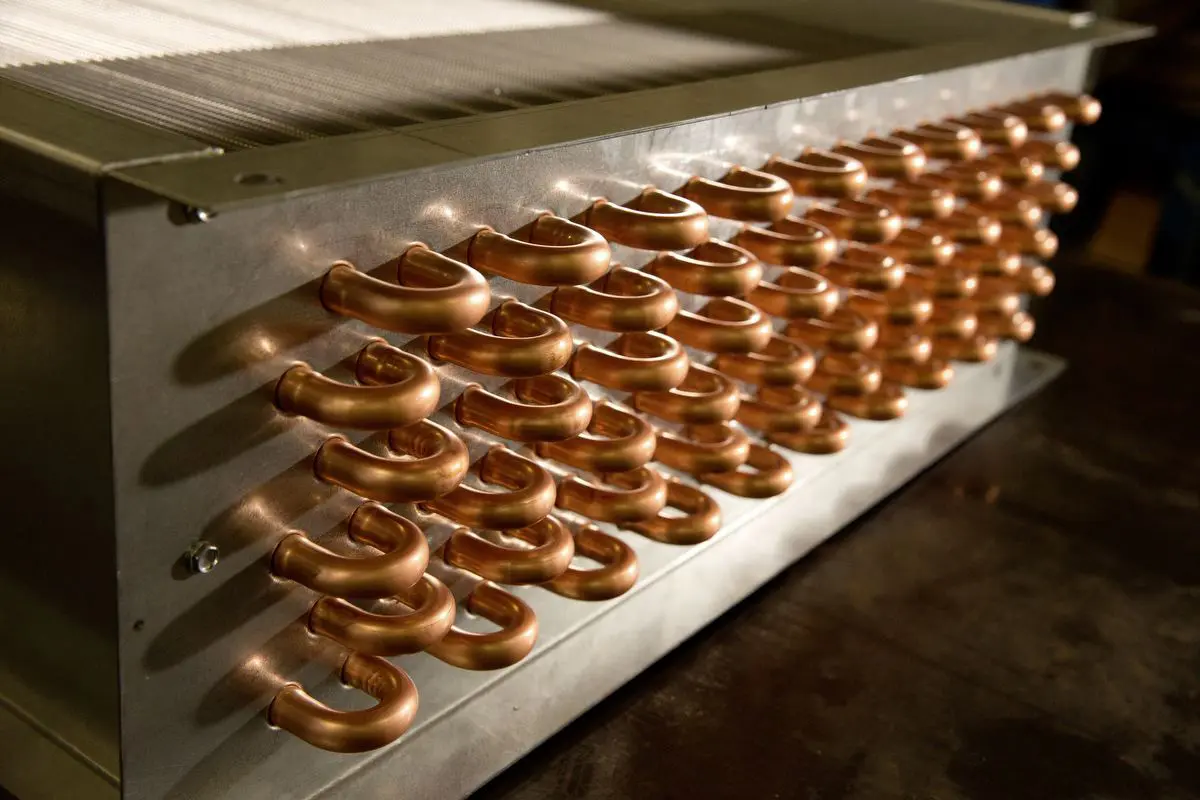
HVAC coils provide the heat-transfer surfaces used in several established data center cooling configurations. In CRAH equipment, chilled water coils absorb heat from returning air as water flows through the tubes. The warmed water travels back to the central cooling plant for further processing.
DX evaporator coils serve a different function. Refrigerant evaporates within the coil, absorbing heat from air passing over its fins. In applicable refrigerant-based systems, condenser coils subsequently release that heat to an outdoor air stream. These components operate within larger engineered assemblies rather than cooling IT hardware independently.
Coil selection affects both thermal capacity and system resistance. Engineers evaluate entering air conditions, water or refrigerant requirements, face velocity, fin geometry, circuiting, and allowable pressure drops. Dimensions and connection locations must also suit the available equipment space. An incorrectly specified replacement can create installation difficulties or prevent a unit from achieving its intended performance.
For replacement work, matching the original footprint is only part of the specification process. Changes to water flow, refrigerant conditions, or required capacity may justify reviewing the original design rather than duplicating it. Coordinating these details early can reduce field modifications and simplify installation in scheduled facilities.
Precision Coils manufactures standard and custom copper tube coils for OEM and replacement applications. Its DX evaporator coils and condenser coils support applicable refrigerant systems, while custom chilled water configurations can accommodate specific air handling requirements. Material choices, special fin options, and stainless steel casings provide additional flexibility where project specifications call for them.
What Factors Influence Data Center Cooling System Selection?
Cooling design begins with a credible heat-load assessment, including expected peak demand and the distribution of equipment across the facility. Engineers must also account for physical constraints such as ceiling height, service clearances, piping routes, and the capabilities of existing electrical and mechanical infrastructure.
Redundancy requirements influence equipment quantity and arrangement. Facilities may need enough available capacity to maintain acceptable conditions when one unit is unavailable for maintenance or repair. Climate, utility costs, water availability, and expansion plans further shape the selection. A system suitable for a new campus may not fit the limitations of an occupied retrofit.
How Can Data Centers Maintain Reliable Cooling Performance?
Once equipment is operating, maintenance should focus on preserving the conditions assumed during design. Teams can inspect airflow paths, confirm sensor accuracy, check valves and pumps, and review alarms for signs of developing problems. Trend data may reveal a gradual loss of capacity before users experience an interruption.
Heat-transfer surfaces require particular attention. Dirt buildup can restrict airflow and impair coil performance, while corrosion or physical damage may eventually require repair or replacement. Cleaning methods should match coil materials and manufacturer recommendations.
Replacement planning also matters. Documenting coil dimensions, connections, capacity, and operating conditions before a failure helps contractors source compatible components. Precision Coils offers expedited manufacturing lead times of one to 15 days for qualifying orders, which can support time-sensitive replacement projects without substituting for appropriate facility redundancy.
Request Custom HVAC Coils for Data Center Applications
Dependable data center cooling requires components matched to the equipment and operating conditions they serve. Precision Coils manufactures custom HVAC/R coils for contractors, engineers, and OEMs seeking application-specific configurations and responsive production support. Contact Precision Coils to discuss coil dimensions, materials, capacity requirements, and project timing. Share your specifications to request a quote for a new installation, retrofit, or replacement.